Part 1 of 5 in our series on moving a mission-critical PowerBuilder application to the web without breaking operations.
The system had been running for about twenty years. It carried the core processes of the business every working day, and nobody could remember the last serious outage.
When we opened the code, we found 1.3 million lines, 366 windows, more than 3,100 DataWindow objects and around 11,000 event scripts. For every window, there were more than eight DataWindow objects, each carrying its own SQL, validation and data rules. Rebuilding the screens alone would have covered only a small part of what the system actually did. Only two people, both on the client's side, really understood how it all fit together.
Early on, we looked at a feature that seemed trivial: duplicating data. One click, a copy, done. Under the surface, it reached into almost every module of the application. Copying a record fired the same actions the system runs when a user fills that data in by hand, and those actions rippled through the whole system. None of it was written down. It just worked, and the business depended on it.
That is the trap with PowerBuilder. The more reliable the system, the easier it is to postpone modernization. And every year you wait, there is more logic like this and fewer people who know where to find it.
Uptime tells you about yesterday, not tomorrow
Stability is a lagging indicator. It proves the system worked yesterday. It says nothing about whether you can still change it next year.
A PowerBuilder application can run for months without a single incident while quietly drifting toward the point where nobody can safely touch it. From the outside, those two states look exactly the same. On the dashboard, everything is green.
The difference shows up only when the business asks for something new. For our client, that moment was expansion into new markets. The question was no longer whether the system worked, but whether it could grow with the company. Suddenly a "small change" takes a quarter, and the estimate comes with a warning that something else might break.
The real risk walks out the door
The biggest threat to a legacy system is rarely technical. It's human.
In most companies running PowerBuilder, the real documentation is in a few people's heads. They know why an invoice is rounded a certain way, which customer has an exception hard-coded since 2009, and which script must never be touched before month-end close.
Those people are retiring, and nobody is replacing them. Few developers start a career in PowerBuilder today. Our client felt this directly: the technology had become so niche that hiring new developers was a real problem.
When the last of them leaves, the company doesn't lose the system. It loses the ability to change it safely. That is a much quieter failure, and a much more expensive one.
Why PowerBuilder hides its logic so well
That lost knowledge is hard to recover because PowerBuilder doesn't keep business logic in one place. It spreads it across three layers that a modern web app would keep apart.
The DataWindow does everything at once. One object shows the data, validates input, tracks which rows changed and writes the SQL. In a web application those are four separate layers. You can't just "reskin" a DataWindow as a web page.
Business rules live inside UI events. Remember the duplicate feature from the opening? Copying data triggered the same events a user fires when typing it in by hand, and those events reached into almost every module. Copy only the screens, and logic like that disappears without an error message.
Part of the logic sits in the database. Stored procedures, triggers and views do their share, over a connection the client keeps open all day.
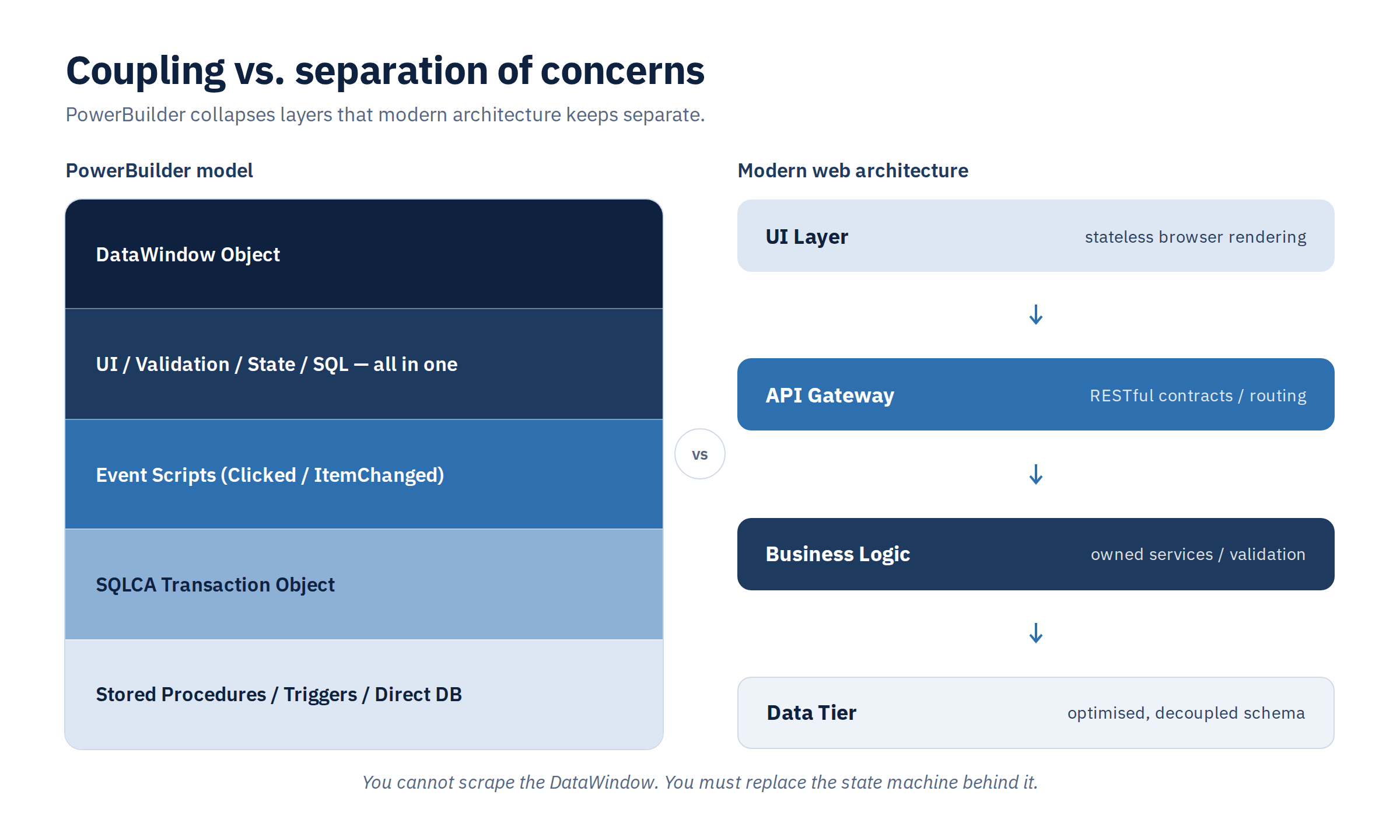
This is why a screen-by-screen rewrite looks fast at first and slows down later. The screens are the easy part. The hard part is everything they quietly do.
The same applies to the two shortcuts you will most likely be offered. An automated converter promises a web app at the push of a button. What you get is code nobody wants to maintain, with the old desktop's limitations now running in a browser. A rewrite from scratch sounds cleaner, but it runs into the same hidden logic – just later, when most of the budget is already spent.
Every year of waiting makes the move more expensive
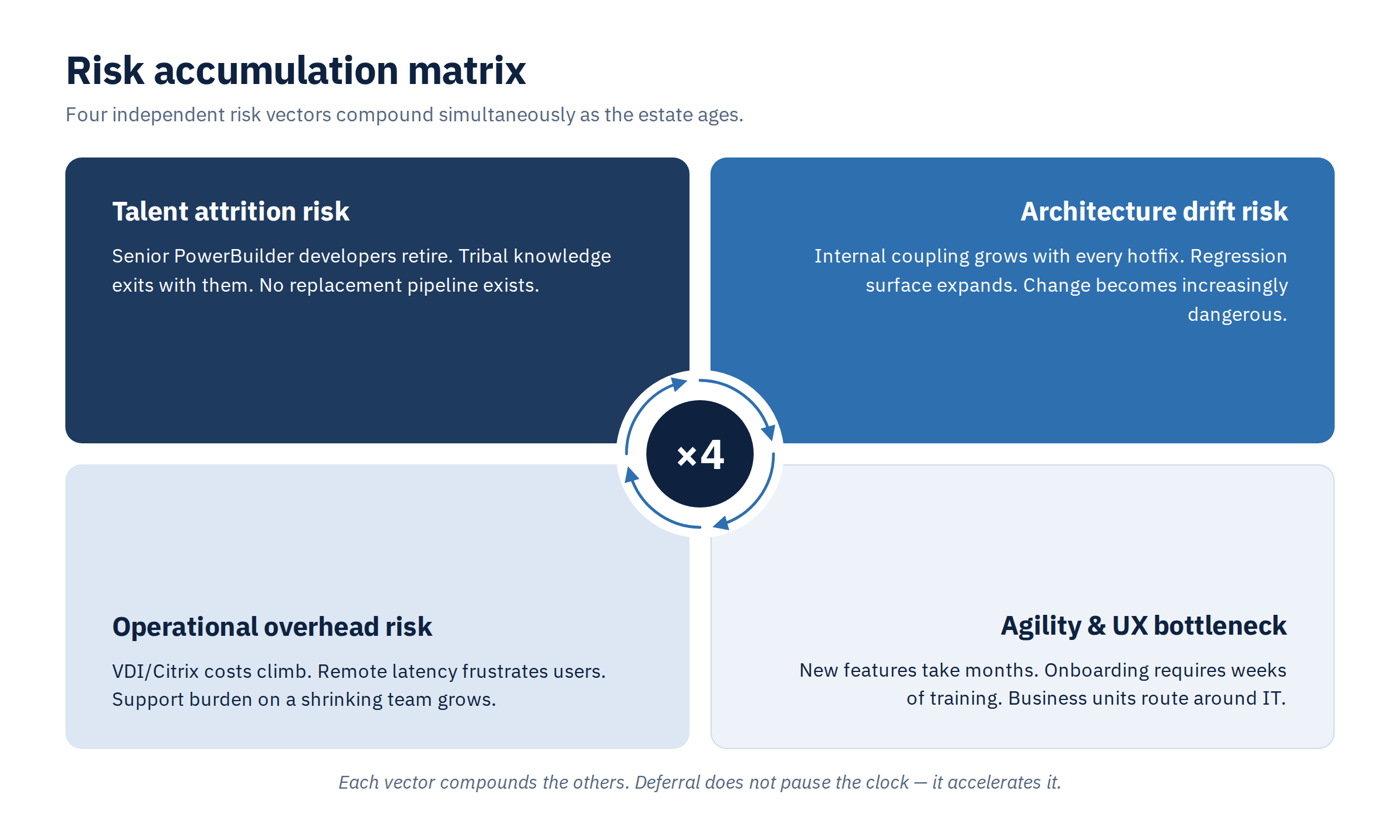
Putting modernization off feels free. It isn't. The bill just arrives in places nobody tracks as "PowerBuilder cost".
Every hotfix adds a dependency. Each year the code grows more tangled, and each release has more ways to break something unrelated.
Remote work runs through a detour. A desktop client-server app can't open in a browser. At our client, every single user worked through remote desktop. That detour brings extra licences, extra servers and a laggy screen, for everyone, every day.
New hires need weeks of training before they can find their way around dense desktop screens.
Integrations hit a wall. Partners expect APIs and real-time events. A monolith with persistent database connections makes every integration a custom project.
None of this shows up as an outage. It shows up as a business that can't move as fast as it needs to.
Before the framework, the foundations
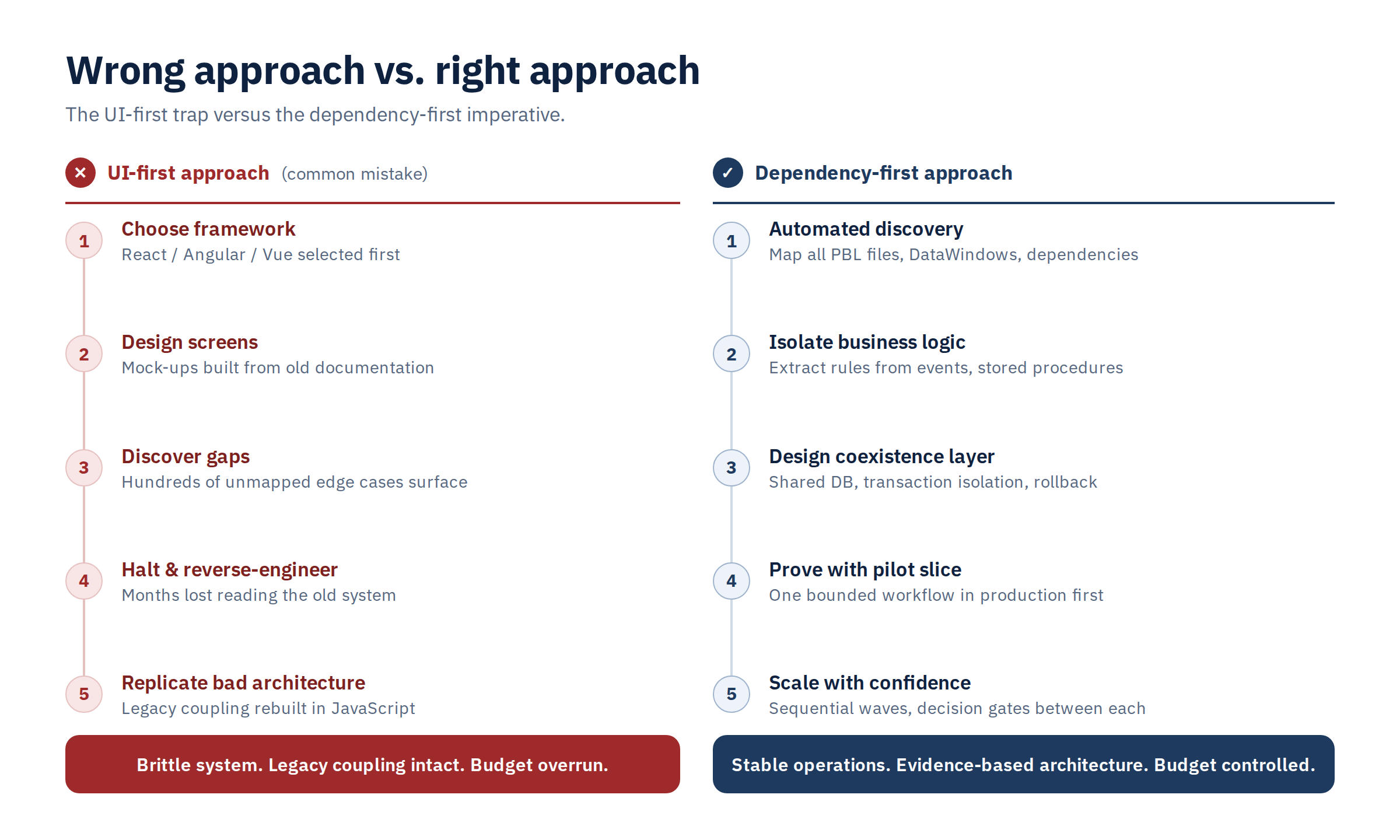
When the decision to modernize finally comes, most teams start with the most visible question: React, Angular or Vue? Within weeks they have beautiful mockups. A few months later they are reverse-engineering the old system to find out what those screens are supposed to do.
The other outcome is worse. Without that analysis, the team rebuilds the old coupling in JavaScript. The new system looks modern and is just as hard to change as the one it replaced.
In our project we started from the other end. We didn't begin with a framework, and we didn't try to document 1.3 million lines up front either. First came the scope: we split the system into measurable epics and agreed three milestones with the client. The hidden logic was then uncovered and rebuilt piece by piece, as part of implementing each epic.
There is one more thing to settle before writing new code: how the old and new systems will live side by side. A migration like this takes months, sometimes years, and the business can't stop for it. For that whole time, the PowerBuilder application and the new web modules work on the same database. Transactions have to stay consistent, and neither system can overwrite the other's changes. A plan that starts with the screens rarely accounts for any of this.
The question that matters isn't "Which framework should we choose?" It's this:
What must keep running, untouched, while we change everything underneath it?
Answer that first, and the framework choice becomes the easy part.
So here is a question to take back to your team: how many people could safely change your core business logic tomorrow? If the answer is "two", or "it depends who's on holiday", the clock is already running.
In Part 2, we will look at seven ways to modernize a PowerBuilder application, from leaving it as-is to full replacement, and the twelve questions to answer before you scope a migration.