Part 3 of 5 in our series on moving a mission-critical PowerBuilder application to the web without breaking operations.
On a slide, the big-bang plan looks tidy. Switch the old system off on Friday evening, switch the new one on Monday morning, and the migration is done.
Now picture that Monday. Something nobody mapped blocks invoicing. Data written over the weekend doesn't match what the new screens expect. And there is no way back, because the old system is already off.
In Part 2, we compared seven paths and recommended modernizing module by module. This part is about doing that without stopping the business: how the old and new systems share a database, what the new architecture should actually fix, how to pick the first slice and how to sequence everything after it.
The short answer: the safest way to move a PowerBuilder application to the web is incrementally. The legacy desktop application and the new web modules run side by side on a shared database, users move in cohorts with a rollback path, and the system is migrated one vertical slice at a time.
An elegant architecture is worthless if deploying it stops the business
For a core system, a single day of downtime or corrupted data can cost millions in lost revenue, compliance fines and reputation. So the real challenge of modernization isn't programming. It's continuity.
The answer to the big bang is phased coexistence: old and new run side by side while functionality moves over piece by piece. In Part 1, we called this the thing UI-first plans forget.
This approach is known as the strangler fig pattern, described by Martin Fowler: the new system grows around the old one and gradually takes over its functions. It is usually implemented with feature flags and canary releases, which route a small group of users to the new module first.
Three things make it work.
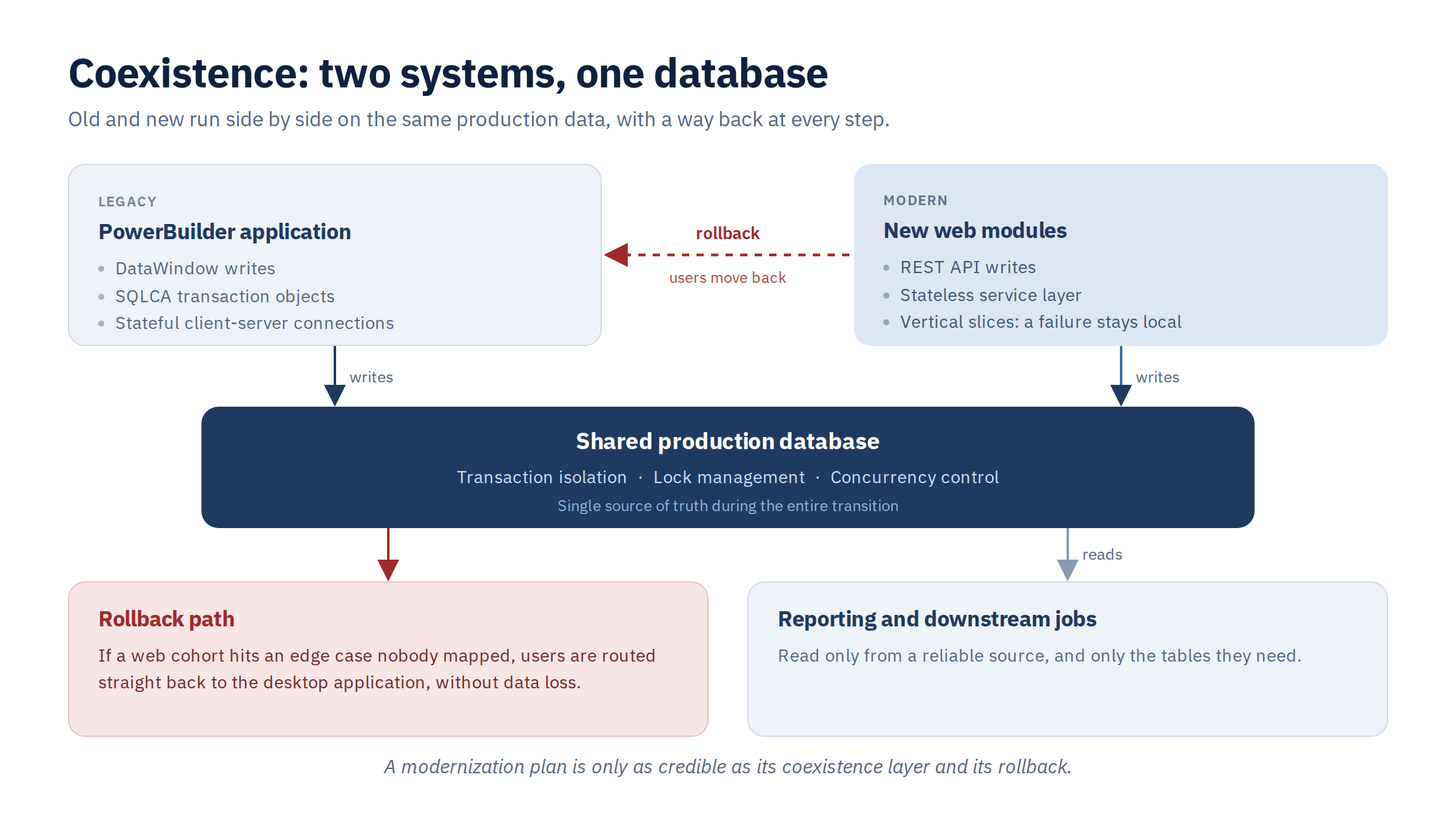
Both systems share one database. For a long stretch, the PowerBuilder desktop application and the new web modules work against the same production data. That takes careful handling of locks, transaction isolation levels and concurrency, so the stateful desktop runtime doesn't clash with the stateless web services.
Users move in cohorts, and can move back. Migrate users in logical, isolated groups. If a group hits an edge case nobody mapped, you must be able to route them straight back to the desktop application without losing data. A rollback that exists only on paper isn't a rollback.
A failure stays local. Splitting the monolith into vertical slices means a bug in a newly deployed web module can't cascade into the legacy transactional core.
A modernization plan is only as credible as its coexistence layer and its rollback.
What the new architecture should actually fix
It's easy to get lost in debates about .NET versus Java versus JavaScript frameworks like React or Angular, or about AWS, Azure and Google Cloud. A good target architecture isn't defined by its framework. It's defined by whether it removes the limits of the client-server model. There are five tests.
It runs in a plain browser. No plugins, no registry changes, no client installs, and no dependence on the endpoint's operating system. That ends local deployment pain and the VDI overhead.
Concerns are separated. Database requests, input validation and business calculations no longer live inside window controls. The target is a clean multi-tier design: a stateless user interface, an API gateway with services behind it, and an optimized data tier.
Logic is reusable through APIs. Core business rules exposed as secure REST APIs, described with OpenAPI, become assets. Once they're decoupled from the interface, they can power integrations, automated workflows, mobile clients and third-party systems.
Releases are automated. No manual compilation and no distributing files by hand. Source control and CI/CD pipelines cut release cycles from months to hours.
You can see what is happening. On the desktop, debugging a client crash means chasing fragmented logs. The web platform should centralize logs, metrics and traces (OpenTelemetry is a common standard for this): every API transaction, database latency spike and client error captured in real time.
Our guiding principle is to migrate functionality, not structure. A DataWindow, PowerBuilder's data-bound object that handles display, validation and SQL, isn't ported as a whole. Its responsibilities are separated and placed where they belong in the new architecture. The table shows how this was done in the ERP system we described in Part 1, with its 1.3 million lines of code and more than 3,100 DataWindow objects. The specific choices vary from project to project, depending on the system and the client's constraints.
| In the PowerBuilder application | In the target web architecture |
|---|---|
| Screens and layouts | Rebuilt on a configurable design system. By default, layouts are migrated 1:1, so users keep working the way they are used to. |
| Data retrieval and SQL inside DataWindows | Moved to a dedicated repository layer on the server and exposed to the browser through a typed API contract. |
| Field-level validation (required fields, value ranges, formats) | Defined once in a shared validation schema and enforced in both the browser and the server. |
| Business-rule validation in UpdateStart and similar events (e.g., overlapping date ranges) | Separated from field-level checks and executed on the server, where it has direct access to the database. |
| Event-driven form behavior (ItemChanged, Clicked) | Reproduced through reusable form hooks, so screens respond to user input the way users expect. |
| Long-running SQLCA transactions with dialogs shown mid-transaction | Redesigned: user decisions are collected before saving, submitted together with the form data, and processed in a single, short server-side transaction. |
| Stored procedures, including user session setup | Kept in the database and called the same way the desktop application calls them, or reimplemented in code, as agreed with the client. Keeping them ensures consistent behavior while both applications run side by side. |
| Desktop-only components (e.g., ActiveX controls) | Replaced with a web equivalent or a custom solution, selected together with the client. |
The first slice decides whether the program builds trust or loses it
The worst move is a big-bang migration of the whole monolith. The second worst is picking a trivial utility module, like a settings panel or a static help lookup, as the pilot. It carries almost no risk, but it proves nothing either. It never touches the hard parts, so leadership learns nothing about whether the target platform will hold.
A good pilot is a vertical slice: a realistic engineering challenge that doesn't put core operations at risk. Check every candidate against six criteria.
Business-meaningful scope. Users or operational managers must see real value once it goes live on the web.
A tightly bounded blast radius. The module has clean, manageable interactions. If the pilot fails, it can be isolated without a cascade.
Technically representative. The slice has to force the team to solve the hard structural problems: the DataWindow engine, core table records, visual triggers.
Coexistence-friendly. It must work in a hybrid state, writing to the same database tables as the desktop client without row errors.
High visibility. Success has to be measurable and visible to non-technical executives, because that builds momentum for the next phases.
Political feasibility. The business unit using the module should be cooperative, open to change and willing to take part in user acceptance testing.
The goal of the first slice is to test your engineering assumptions and build the team's confidence. It isn't to show off the most ambitious architecture you can imagine.
A roadmap built on gates, not dates
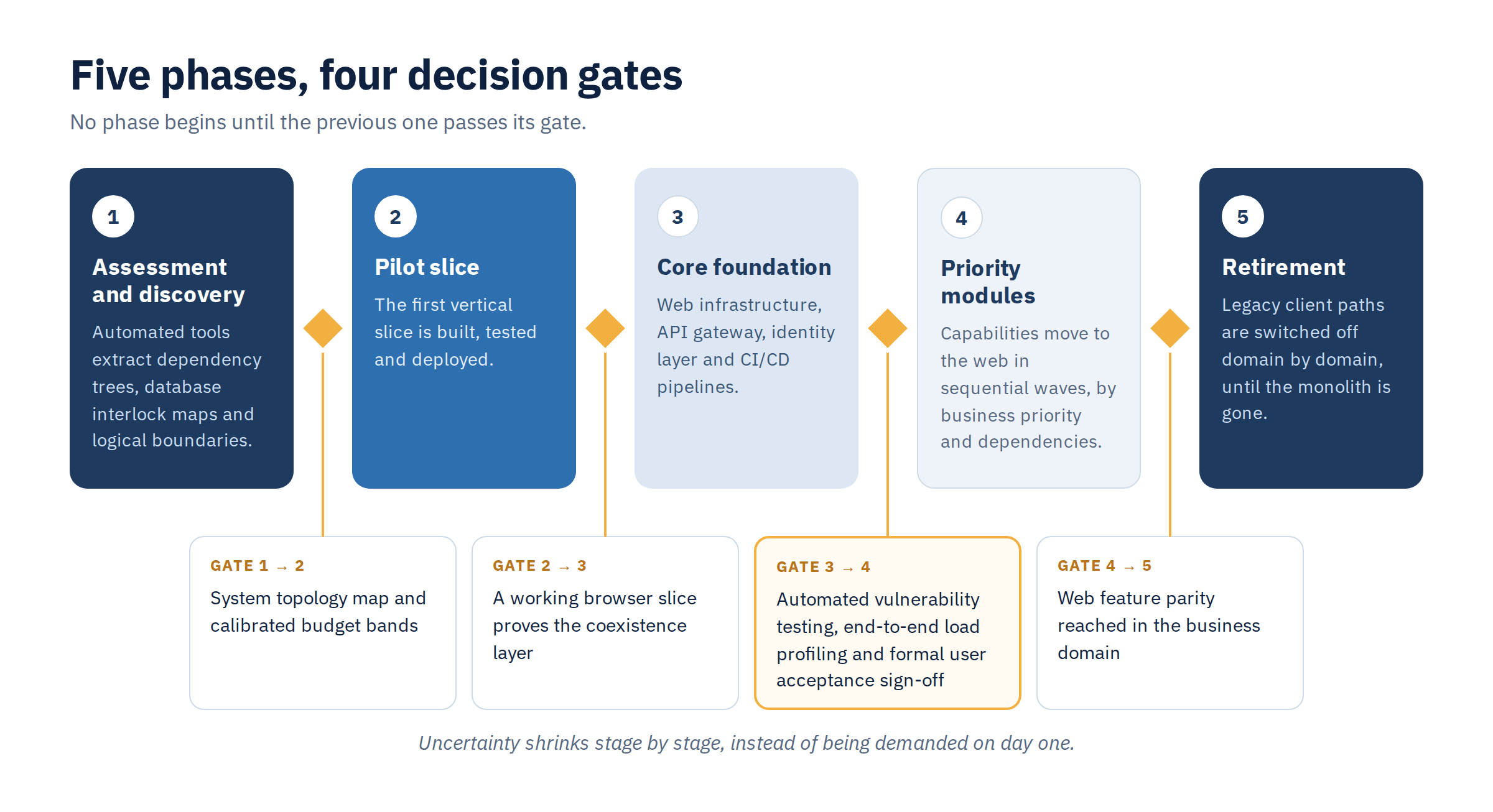
Calendar dates don't survive contact with a large PBL (PowerBuilder Library) codebase, because you keep discovering hidden things along the way. A credible roadmap is driven by architectural milestones and validation data, and split into phases separated by decision gates.
Phase 1: assessment and discovery. Automated tools process the source and extract dependency trees, database interlock maps and logical boundaries. You get a system topology map and calibrated budget bands.
Phase 2: the pilot slice. The team builds, tests and deploys the first vertical slice. The result is a working browser capability that proves the coexistence data layer.
Phase 3: the core foundation. Core web infrastructure, the API gateway, an OAuth2/OpenID Connect identity layer and containerized (for example, Docker) CI/CD pipelines.
Phase 4: priority modules. Capabilities move to the web in sequential, independent waves, ordered by business priority and technical dependencies.
Phase 5: retirement. As web parity is reached for a business domain, the matching legacy client paths are switched off, until the monolith is gone.
The gates are strict. A project doesn't enter Phase 4 until Phase 3 passes automated vulnerability testing, end-to-end load profiling and formal user acceptance sign-off.
This replaces a demand for certainty on day one with uncertainty that shrinks stage by stage.
So here is a question to take back to your team: how quickly could you send a group of users back to the old system, without losing a single record? If nobody can answer that, the plan isn't ready for a first slice.
Frequently asked questions
Can you migrate a PowerBuilder application to the web without stopping the business?
Yes, if you migrate in phases. Old and new run side by side on the same database, users move in small groups with a way back to the desktop application, and each module is a separate slice, so a failure stays local.
What happens to DataWindows when you migrate to the web?
It isn't ported as a whole. SQL, validation and event behavior are separated and placed where they belong: a server-side repository behind a typed API, a shared validation schema, server-side business rules and reusable form hooks.
How do you choose the first module to migrate?
Pick a vertical slice that is realistic but safe for core operations: visible business value, a bounded blast radius, the hard structural problems, coexistence with the desktop client, visibility to executives and a cooperative business unit. A trivial module proves nothing.
What are the phases of a PowerBuilder migration roadmap?
Five, separated by decision gates: assessment and discovery, a pilot slice, the core foundation, priority modules in waves, and retirement of the legacy paths. Phase 4 doesn't start until Phase 3 passes vulnerability testing, load profiling and user acceptance sign-off.
In Part 4, we look at how to keep a program like this on course: the governance that protects it from scope creep and architectural drift, a realistic view of where AI helps and where human judgment stays essential, and what a credible assessment should deliver.