Part 5 of 5 in our series on moving a mission-critical PowerBuilder application to the web without breaking operations.
It's budget season, and someone in finance asks for a small change: a new tax rate, effective the first of the month. On paper, it's one line in one business rule. IT says it will take a quarter. Every release of the desktop application needs weeks of manual regression testing, and nobody is quite sure what else the change touches.
Nobody panics. The system is up, invoices go out, month-end closes on time. The team has a workaround, as it always does. The request gets a slot in the next release, and the meeting moves on.
That's how most companies live with a PowerBuilder system for years. Not in a crisis, but in a long string of workarounds that each looked reasonable at the time. After a while, you stop seeing them.
In Part 4, we covered governance, the role of AI and what a credible assessment delivers. This last part is about the decision itself: how to tell that your current model has stopped being sustainable, and how to start without signing up for a multi-year program on day one.
The short answer: if three or more of the seven warning signs below describe your system, the current model has stopped being sustainable, and the next step is an assessment, not a rewrite. You can start with a fixed-scope assessment, prove the approach on one pilot slice, and only then commit to a phased program, with a decision after each stage.
If three of these sound familiar, the model has stopped working
Teams get used to friction. Workarounds pile up until they feel like the process, and nobody inside notices them anymore. Check your system against these seven signs. And don't do it alone: ask the people who train new hires, the people who run support and the business unit leads. Many of these signs are invisible from the CTO's chair.
- Small changes take weeks. A simple field update or a tax-rate change needs weeks of manual regression testing, and the release waits on compilation across multiple PBL (PowerBuilder Library) files. A quick test: how long did your last small change take, from request to production? This is the release slowdown described in Part 2.
- New people can't find their way around. The desktop screens are so dense and fragmented that new employees need weeks of training, and early data-entry errors stay high. Ask how long it takes a new hire to work without help.
- Remote work runs through a remote desktop. Citrix or VDI (virtual desktop infrastructure) adds lag and slows down everyone who isn't sitting in the office. It also brings the extra licences and servers described in Part 1.
- A few senior developers hold it together. The pool of PowerBuilder developers who can safely change the code is small and shrinking, many are close to retirement, and nobody is coming up behind them. Ask what happens to the next release if one of them is unavailable for a month. This is the risk described in Part 1.
- Integrations are held together with workarounds. Connecting a modern SaaS (software as a service) platform, an external webhook or a mobile app takes custom middleware or fragile database-level sync scripts. Every new integration becomes a small project of its own.
- The business has stopped waiting for IT. Business units no longer trust delivery timelines, so they buy their own standalone tools for problems the core system can't solve. That's shadow IT, and it's a vote of no confidence.
- Upgrades keep getting postponed. Leadership keeps putting off necessary changes because the application is too fragile to touch without risking downtime. The system hasn't failed, but nobody dares to change it.
No single sign is a verdict. Our rule of thumb is that three or more make a pattern. Count them, then look at which ones you can back with data. The signs you can only describe from memory are the ones to look at first, and the twelve areas described in Part 2 are a good place to start.
One or two signs don't mean you should start a migration. They may point to a cheaper path from the seven described in Part 2, such as stabilizing and documenting the system when key people are about to leave, or wrapping its logic for a new portal. But if three or more are true, don't wait for an outage or an urgent market demand to force the decision. A move made under pressure is the riskiest kind.
You can start without a multi-year contract
The usual way to buy modernization is all-or-nothing: a multi-year contract signed before anyone has mapped a single dependency. That puts all the financial and operational risk at the start, when the team knows the least about your system.
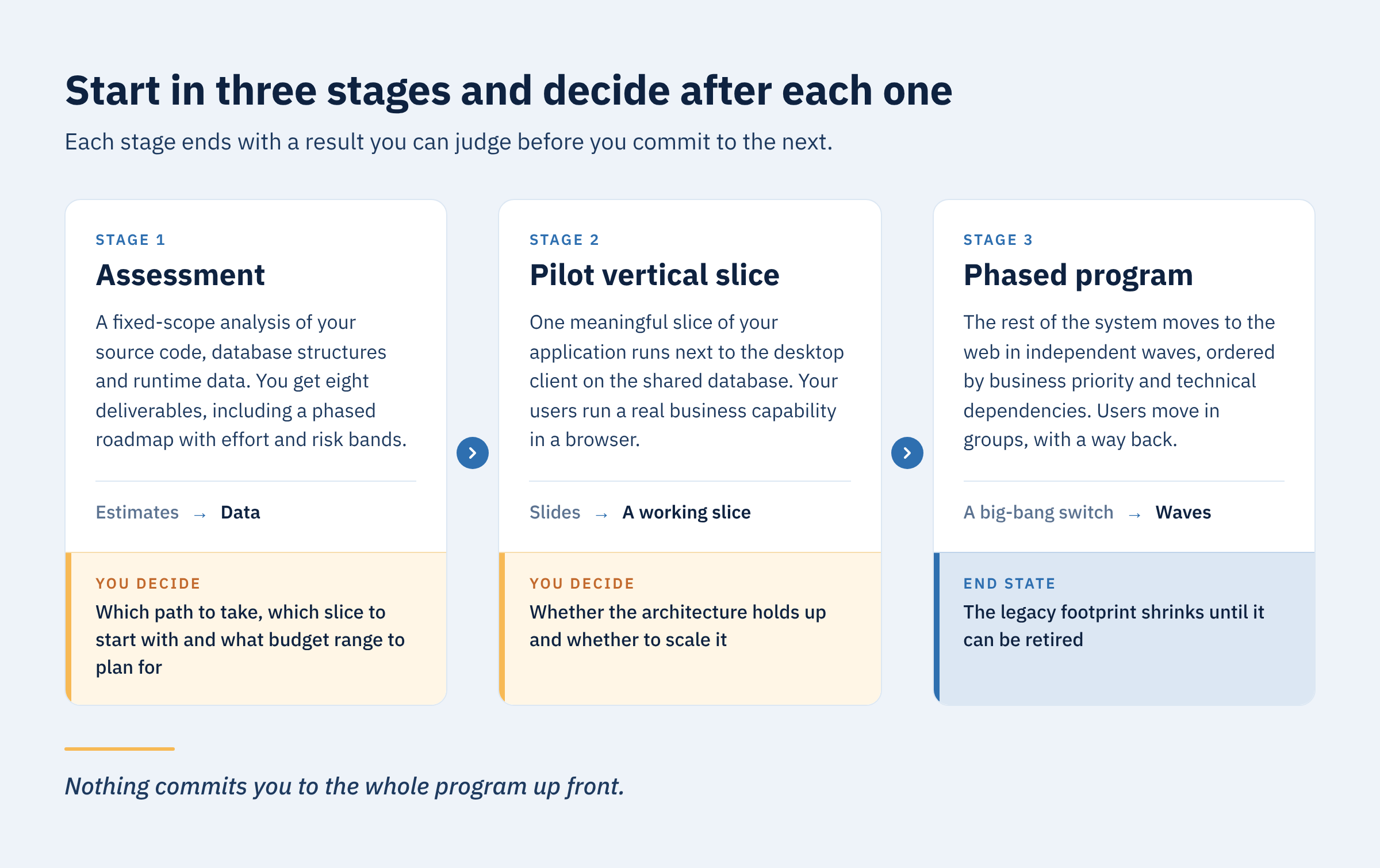
There's a safer way to begin, in three stages. Each one ends with a result you can judge before you decide on the next.
- Assessment. A tightly bounded, fixed-scope analysis. Engineers go through your source code, database structures and runtime data, with automated tools doing the heavy extraction. You get the eight deliverables described in Part 4, including a phased roadmap with effort and risk bands.
- Pilot vertical slice. Instead of slides about the target architecture, the team builds one meaningful slice of your application, chosen against the criteria described in Part 3. It works alongside the desktop client on the shared database, and your users run a real business capability in a standard browser. How and where it goes live is agreed with you up front. The pilot builds the core web infrastructure, tests the coexistence layer and shows whether the architecture holds up with real users.
- Phased program. With the pipeline proven, the rest of the system moves to the web in independent waves, ordered by business priority and technical dependencies, following the phases described in Part 3. Features reach users continuously, so the business sees value along the way while the legacy footprint shrinks, until it can be retired.
Each stage replaces an assumption with evidence. The assessment replaces estimates with data. The pilot replaces slides with a working slice. The program replaces a big-bang switch with waves, and users move in groups with a way back to the old system, as described in Part 3. At the end of each stage, you decide: after the assessment, which path to take, which slice to start with and what budget range to plan for; after the pilot, whether the architecture holds up and whether to scale it. Nothing commits you to the whole program up front.
How we work: assess first, prove second, scale when the path is clear
The three stages follow from how our team works. Four principles shape it.
We know PowerBuilder from the inside. We bring about a decade of hands-on experience with how it works under the hood: PBL inheritance trees, client-side data caching and the DataWindow lifecycle. That's what lets us extract business logic without silent runtime errors.
We put continuity first. No big-bang releases. Every roadmap we build rests on phased vertical slices, regression checks and a database coexistence layer, so your company keeps transacting throughout the change.
One team covers all the disciplines. Architects who understand relational database coupling, UX designers who turn dense desktop layouts into clear web interfaces, and backend engineers who build stateless REST APIs work in one delivery pipeline.
We use automation, and we verify it. Our automated analysis tools process source code and database schemas to produce dependency graphs, find unreferenced objects and surface hidden validation chains. As described in Part 4, AI speeds up the analysis, and engineers check everything it produces.
The order doesn't change: we assess first, prove second, and scale only when the technical path is clear.
So here is a question to take back to your team: which of these seven signs have you already learned to work around? If the honest answer is "most of them", you know what the next step is.
Frequently asked questions
What are the warning signs that a PowerBuilder application is no longer sustainable?
There are seven: small changes that take weeks, hard onboarding, remote work through Citrix or VDI, dependence on a few senior developers, integrations held together with workarounds, business units buying their own tools, and upgrades that keep getting postponed. Three or more signs mean it's time for an assessment.
How can you start a PowerBuilder modernization without a multi-year contract?
Start in three stages: a fixed-scope assessment, a pilot vertical slice and a phased program. Each stage ends with a result you can judge before you decide on the next one.
What do you get from a modernization assessment?
Eight deliverables, from a business criticality map and a dependency graph to a pilot slice recommendation and a phased roadmap with effort and risk bands. Part 4 describes all eight.
Why start with a pilot slice instead of a full rewrite?
A pilot tests the architecture and the coexistence layer on a real business capability before you commit to the rest of the system. A full rewrite asks you to commit first and find out later.
That's the end of the series. In Part 1, we showed why a stable PowerBuilder system isn't necessarily a safe one. Part 2 compared seven modernization paths and the twelve questions to answer before scoping. Part 3 covered coexistence, the first slice and a roadmap built on decision gates. Part 4 was about governance, AI and what a credible assessment delivers.
If three or more of the signs above sound familiar, the next step is an assessment. Get in touch and we'll talk through what it would look like for your system.