Part 2 of 5 in our series on moving a mission-critical PowerBuilder application to the web without breaking operations.
Once a company accepts that its PowerBuilder system has to change, the proposals arrive fast. A vendor demos a converter. Someone suggests moving everything to the cloud. Someone else wants to rebuild it in React and be done with it.
Each of these answers a different question. And most teams pick one before they have asked the right question at all: what should actually happen to this application?
In Part 1, we showed why a stable PowerBuilder system isn't necessarily a safe one, and why starting with new screens is the fastest way to put it at risk. This part is about the decision that comes before any code. We compare seven paths, look at the four signals that justify a full rewrite, and list what you need to know about your system before anyone puts a number on the budget.
Seven paths, and only one of them is a rewrite
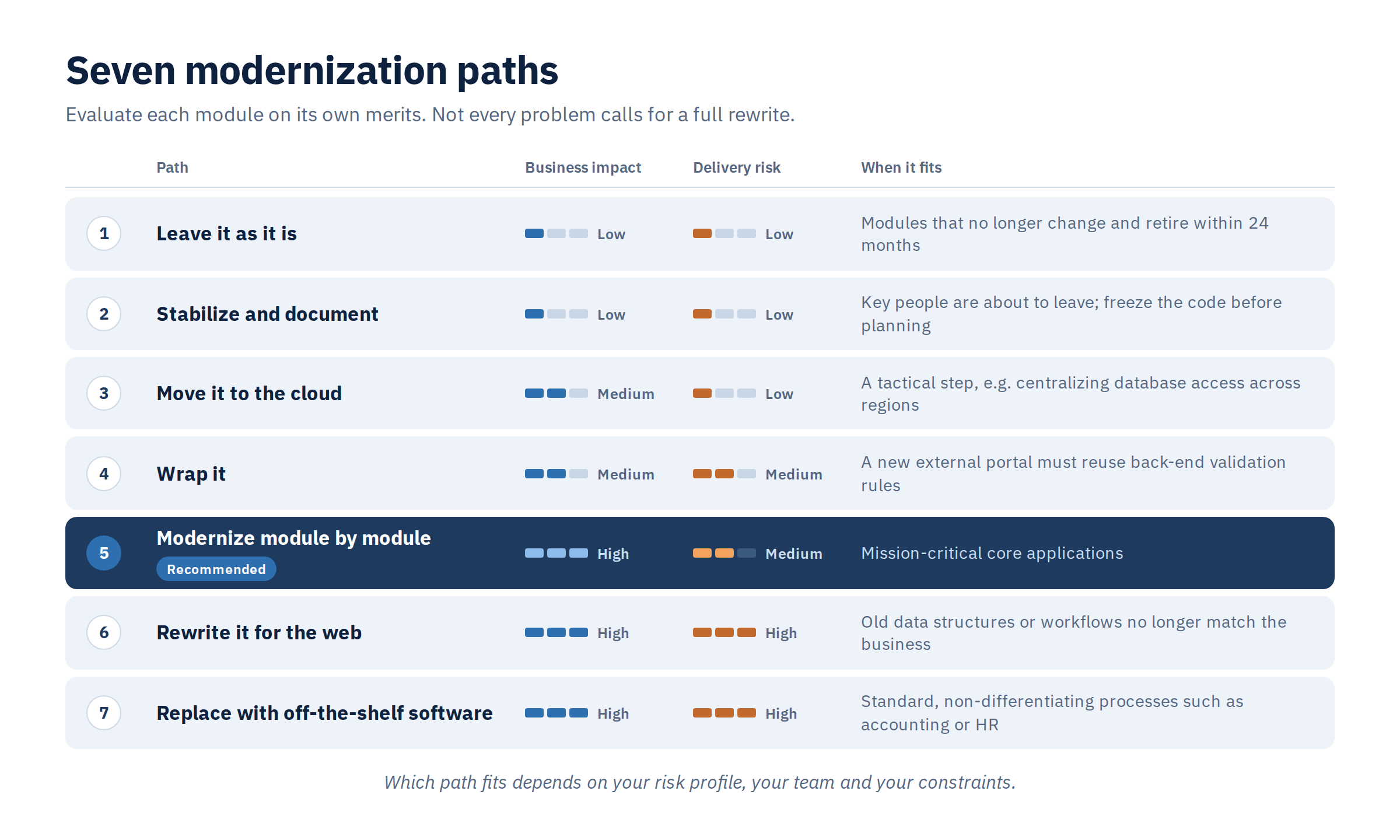
Not every problem with an old application calls for rebuilding it. The right path depends on what the system does for the business, how much risk you can carry and how much you can spend. For core systems of record, there are seven realistic options.
1. Leave it as it is. No spending now, and the specialized workflows stay intact. But the debt keeps compounding, and so does the risk of losing the people who understand the system. It only makes sense for modules that no longer change and will be retired within 24 months.
2. Stabilize and document. Cheap, and it turns tribal knowledge into something written down. It does nothing about the desktop client or the VDI bill. This is the move when key people are about to leave and you need to freeze the code before planning anything longer.
3. Move it to the cloud. Removes the on-premises hardware. You still pay for VDI, and users still don't get a browser app. Useful as a tactical step, for example to centralize database access across regions.
4. Wrap it. Exposes existing logic to new web applications without moving the PowerBuilder code. The price is complexity: you need a middle tier that manages state. It fits when a new external portal has to reuse heavy back-end validation rules.
5. Modernize module by module. Risk stays under control, spending is spread over time, and the business sees results along the way. It needs serious data-synchronization scaffolding between the old and new parts. For mission-critical core applications, this is the path we recommend.
6. Rewrite it for the web. Clears the technical debt and lands on a modern, cloud-native stack. It also carries the highest delivery risk and invites scope creep. It makes sense when the old data structures or workflows no longer match where the business is going.
7. Replace it with off-the-shelf software. Maintenance moves to a vendor for good. The business has to rebuild its processes around the product, and whatever made them its own is gone. Only worth it for standard, non-differentiating processes like accounting or HR.
What about Appeon PowerServer?
It's one of the first options PowerBuilder teams look at, so it deserves a straight answer.
Current versions of PowerServer recompile an existing application into an "installable cloud app": a Windows desktop client, distributed and updated over the internet, that reaches the data through generated REST APIs instead of a direct database connection. In practice, it's an advanced form of moving to the cloud. It removes Citrix or VDI, moves SQL execution behind the firewall and simplifies deployment, all with minimal code changes.
What it doesn't do matters just as much. It isn't a browser-based web application, and it doesn't modernize the application itself. The user interface, the PowerScript code, the event-driven logic and the need for scarce PowerBuilder skills all stay. The generated APIs are built to serve the PowerBuilder client, not wider integration across the company.
Treat PowerServer as a tactical bridge. It's a sensible choice for a system with a limited remaining lifespan, or a way to buy time while a phased modernization is planned and carried out.
Which path fits depends on your risk profile, your team and your constraints. Not on what's fashionable this year.
When a full rewrite is worth the risk
Module-by-module modernization is usually the safest route for core systems. But there are clear thresholds where rebuilding the whole thing becomes the right call. To spot them, you have to separate complaints about "old software" from measurable business facts. There are four signals.
Nobody can learn the system anymore. New staff need weeks of training to find their way around the old navigation, or the screens themselves cause data-entry errors that hurt customer SLAs. A fresh coat of paint on the interface won't fix that.
Releases have ground to a halt. The code is so tangled across multi-megabyte PBL files that a simple change needs weeks of regression testing. When a change in one module quietly breaks something unrelated and the business can't ship on time, the architecture is exhausted.
The system has to run in a browser, full stop. The business moves from internal operations on a closed network to serving the outside world as a multi-tenant service: thousands of B2B clients, field agents, mobile devices. Streaming a desktop app through VDI or Citrix, with its latency, configuration and licences, stops being an option.
Keeping it alive costs more than replacing it. The yearly cost of the old system overtakes the amortized cost of rebuilding it. That includes specialist contractor rates, legacy database licences and the growing effort of patching security holes in an outdated runtime.
When these signals show up, the question changes from whether to modernize to how to control the transition. Even a justified rewrite needs strict engineering discipline. It should start from an automated analysis of the current system, not from guesses based on old documentation.
Finding that tipping point takes data, not intuition. That's where a structured technical assessment is worth far more than an internal estimate.
What you need to know before anyone gives you a number
Most modernization budgets fail for one reason: incomplete discovery. Companies scope a migration by counting windows or guessing team size. In Part 1, we showed what that misses: a system with 366 windows held more than 3,100 DataWindow objects and around 11,000 event scripts. The real complexity sits where no window count can see it.
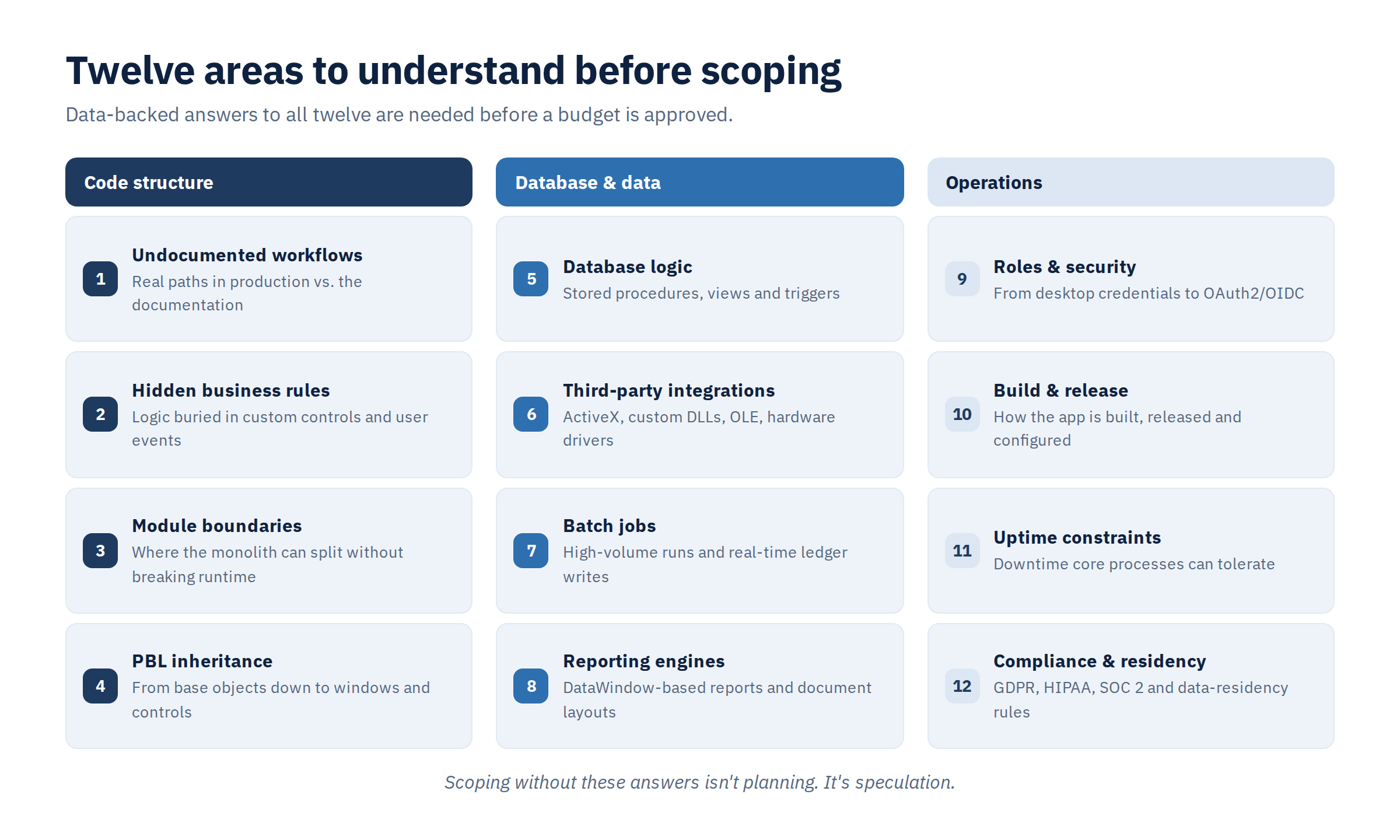
Before you approve a budget, set a deadline or pick a framework, you need data-backed answers in twelve areas. They fall into three groups.
Code structure. Which workflows users actually run in production, as opposed to what the documentation describes. Which business rules are buried inside custom controls and user events. Where the module boundaries are, so the monolith can be split without breaking what runs at the same time. And how deep the inheritance goes across PBL libraries, from base objects down to windows and controls.
Database and data. How much logic lives in stored procedures, views and triggers. Which third-party pieces the system depends on: ActiveX controls, custom DLLs, OLE automation, hardware drivers. Which batch jobs handle high-volume processing and real-time ledger writes. And how the DataWindow-based reports and document layouts are built.
Operations. How user roles and permissions will move from desktop credentials to modern identity layers like OAuth2/OIDC. How the application is built, released and configured today. How much downtime core financial or transactional processes can tolerate. And how GDPR, HIPAA, SOC 2 and data-residency rules apply once the application runs on a stateless web tier.
Scoping without these answers isn't planning. It's speculation.
Getting them by hand, by reading millions of lines of code, invites mistakes. The reliable way is automated code analysis that pulls the real structure of the system straight from the source.
So before you ask how long the migration will take, ask your team a different question: how many of these twelve could we answer today, with data rather than memory? If the honest answer is "only a few", the next step isn't implementation. It's discovery and assessment.
In Part 3, we turn to execution: how to keep the business running while old and new systems coexist, what the new web architecture should actually improve, how to pick the first slice to modernize, and how a phased roadmap with clear decision gates reduces risk step by step.